Billing
Once an Account has been selected you can use the left side menu to access billing information for that Account. This shows you how many credits you have left on your account, active and expired credit bundles as well as a detailed breakdown of how any credits have been used.
Typical Billing screen
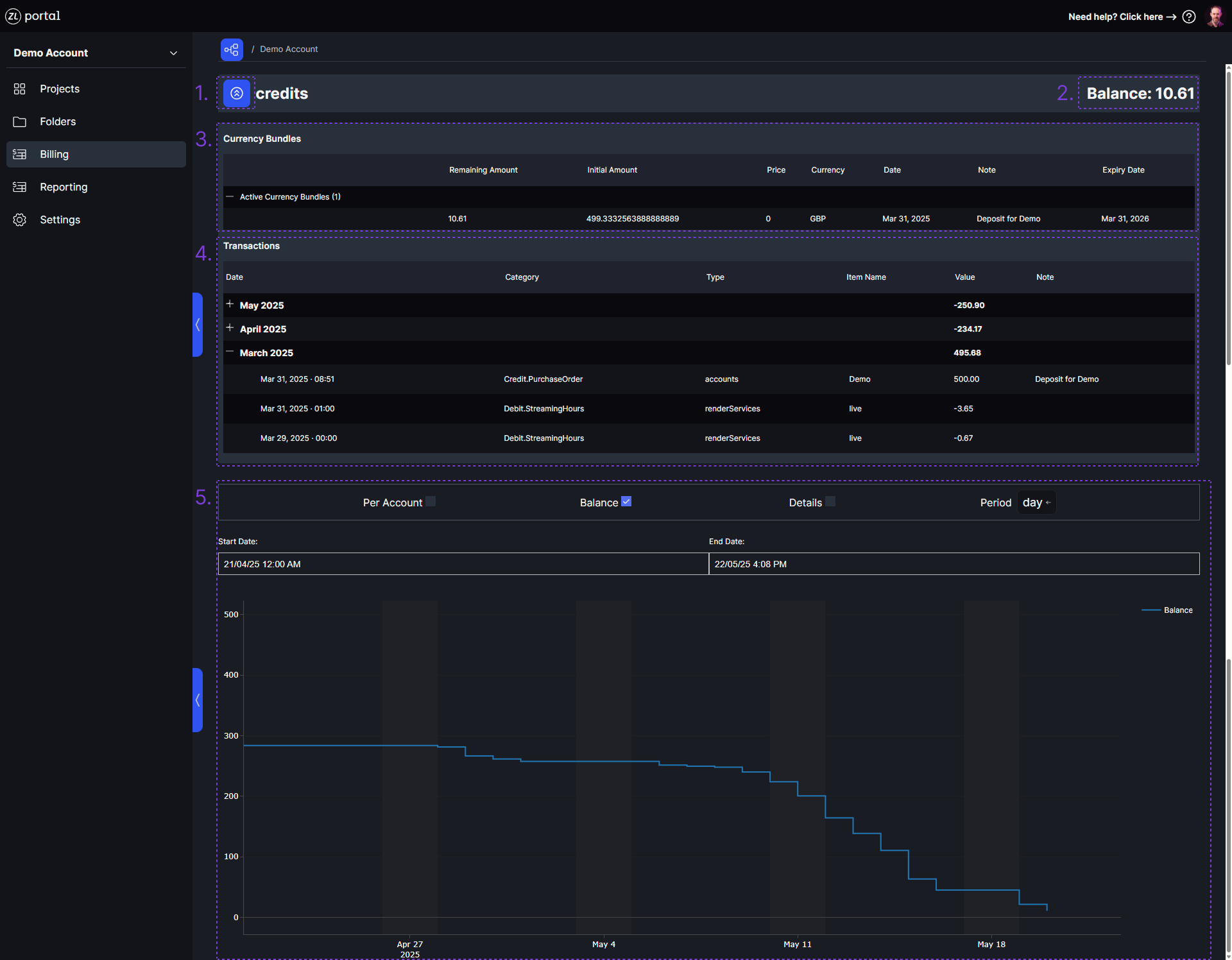
Key
1. Expand Currency Bundles and Transactions
The control to expand Currency Bundle and Transaction details.
2. Current Account Balance
The current balance on the account as of midnight UTC.
3. Currency Bundle Details
This details all the currency bundles that have been applied to your Account, split by bundles that are currently active and bundles that have expired. Bundles can become inactive either by having all of their credits used, or if their expiration date passes. As standard, purchased bundles are valid for 1 year from the activation date of the bundle. If there are multiple bundles active on an Account, the bundle with the closest expiration date will be used in preference to all other bundles.
4. Transaction Details
The breakdown of all transactions that have consumed credits from a Currency Bundle. Usage from streaming is billed or the previous 24 hours at midnight UTC. Billing is done to the nearest second.
5. Credit Balance Over Time
A graph showing credit usage over time.